
- What are the goals of Apple’s website? How does Apple’s website address the needs of a user who has just purchased their first MacBook?
- Apple’s goal is to attract those who are interested in the latest trends in technology and reflect the characteristics of their products on their website while making it simple to purchase and obtain them. The website addresses the needs of new users by setting up multiple ways to interact with employees and help services as well as allowing them to easily access manuals, forums, and information on their products. Their purchasing system is also simplified for easy maneuvering and a speedy, straightforward checkout.
- What are the functional specifications of Facebook’s wall? If you are not on Facebook, what are the specs for the signup page?
- Facebook includes a multitude of functional specifications on the typical user’s wall, including a feed of “organic” material made up of text, video, and picture posts with a full menu that leads you to your groups, favorites, applications, and a number of other categories specified by the user, a chat box with a list of online friends, links that allow you to travel to your page and profile and multiple ways to connect to your friends’ pages.
- What are four architectural approaches to information structure? Find one example of each.
- Hierarchical:
- Each node has a parent node that trace back to a single point in which they all connect.
- Most websites are structured as it is the most common form of structure in the list. Apple would be an example of this as it guides the user through its sight and tends to have a pre-determined path defined.
- Organic:
- All elements of the website are connected on a case-by-case basis, meaning that the site does not directly control where the user is likely to go as there are too many given paths to be able to foresee a set path.
- An example of this is Wikipedia. This site allows users to search for specific items and within teach item are numerous in-text links that take you to an entirely different article, free from the one before it.
- Matrix:
- A mean that allows you to narrow your search among a number of nodes.
- Many shopping sites, typically for clothing, have menus that allow you to narrow your search results by specifications like color, size and style, resulting in a matrix structure.
- Sequential
- This structure allows only one straight path for the user to navigate. This would include media like TV and video, as you can only proceed forward or background rather than hop from node to node.
- Many checkout scenarios offer this structure, so that the user can only travel the step-by-step process of purchasing a product, rather than giving them the option to be distracted or lose interest in buying.
- Hierarchical:
- What percentage of The Huffington Post index page is navigation, and what percentage in content? What about Google, Wikipedia, and Etsy?
- Most of The Huffington Post is navigation. The entirety of the home page is made up of two navigation/search bars and the rest is a wall of links and photos to the daily articles posted by the post, but this also leads me to believe that the number of links leads to a large amount of content made available by said links. Google, itself, is purely navigational as it is a search engine. While it provides us with an unlimited amount of content, it is not the source of the content, but simply a means of acquiring it. Wikipedia is almost the opposite of Google, though, in the sense that you can search practically anything, but it also provides information and content on what you search without redirecting you to an entirely different site. Then, there is Etsy, an online shopping site, that I would say has the least amount of navigation. It has its items sorted in to categories that you can browse and narrow, but that is typical of most sites.
- How does http://www.landor.com guide the readers’ eyes and focus their attention on what is important?
- Landor has quite a unique layout that really moves the reader’s eyes over the entirety of the page. Unlike most sites that just lay out all of their information and navigation options, Landor forces the user to physically move through the site with the use of a fade in technique that doesn’t allow the user to clearly see what is next on the page unless the user moves over it. It gives a sense of motion to the page that immerses the user in to the site.
Assignment #1
- The goals of Apple’s website are to sell their products, inform the user, and
provide technical support. Apple addresses the needs of a user who has just
purchased their first MacBook by displaying available accessories and
showing user support if they are having trouble.
- Some functional specifications of a Facebook wall include the user’s post in
order to connect people, chat to talk to people, and a search bar. For the
signup page, it displays a security system to login and a signup form.
- Hierarchical shows what’s the most important first and an example would be
Apple’s website.
A matrix structure allows the user to navigate through everything in the site
because it’s all connected and an example would be Amazon.
Organic structures have paths that don’t completely connect and an example
is Wikipedia.
Sequential structures move only forward or backward in the order that the
content is presented like a video or book.
- The Huffington Post has a lot of navigation to different articles so I would so
50% navigation and 50% content, Google 100% navigation, Wiki 50% nav.
and 50% content, and Esty 60% nav. 40% content.
- Landor guides the readers’ eyes by using a visually appealing color palette,
showcasing very clear and striking images, and having big easy to read
headings with some content.
Elements of User Experience questions
- The goals of Apples website is to be easily accessed and simple navigation to any part of the site. For new buyers or and questions Apple provides a support page so that users can trouble shoot their questions or they also have the option to speak with someone one on one.
- The function of the Facebook wall is to display a profile picture any posts the user may have made, a sample of some of their most recent photos and a friends list. The Content Inventory is needed for the set up of such a profile so that similar information such as name, birthday, photos, and posts are displayed on every profile page or Facebook wall.
- The first structure is the Hierarchical approach and the apple home page is an example of this structure. It has links that remain at the top of every page and hold parent links to other links that can be thought of as child links. The second is the Matrix approach and websites like Amazon follow the matrix to navigate the website by selecting a type of product and narrowing down the search by also selecting a color or style of product that they are searching for. The next structure is the organic, this approach does not follow any consistent pattern and websites like Wikipedia is connected case by case instead of by a category. Finally the final structure is sequential, this approach is mostly used when a user is making a purchase on a website so they must follow steps to achieve an outcome in a sequence and not any random order.
- On most of these sites content is fairly dominant and the actual navigation is at the bottom of the page with many links.
- The Landor website uses contrast and color as well as hierarchy to guide the reader and also uses an arrow on the homepage to make the readers see more of their content when it is clicked. The use of bright yellow really catches the users attention and making the text black when scrolled over also catches the eye and users can’t help but read.
ARTM2220 Designing for New Media
1.) What are the goals of Apple’s website? How does Apple’s website address the needs of a user who has just purchased their first Macbook?
Apple’s goal is to reach the users goal, meaning that the website is easy and clear to read and also easy to navigate through to find what they are looking for. They sort it all out on the navigation bar. You can choose which “Mac” you purchased or want to purchase and if you do not know they also have the names and small icons to make it easy for the user. It is easy for all ages to use. It is quick and easy and a very user friendly website!
2.) What are the functional specifications of Facebook’s wall?
The functional specifications would be to share and communicate. How does Facebook allow you to do that? By having chats, posting pictures, by having albums to store your photos in, and also being able to post things. You can also search and add friends to stay in touch with them.
3.) What are the 4 architectural approaches to information structure?
Hierarchal: The most important stuff. It is the “navigation bar.” People find the most important factors of the website on this structure. Apple’s website would be an example of this.
Matrix Structure: How things relate. Allows the user to move from place to place and navigate. An example of this would be Library.rmu.edu
Organic Structure: Not organized by patterns. It is very unique because not everyone will have the same “movement” as you can say. Not everyone ends up in the same place. An example of this would be Wikipedia.
Sequential Structure: A sequence, something like a video, a movie or a book. Amazon would be an example of this.
4.)What percent of the Huffington Post index page is navigation and what percent is content?
I would say that the Huffington Post would be about 80% navigation and 20% content
Google: 80% navigation, 20% content
Wikipedia: 90% navigation, 10% content
Etsy: 60% navigation, 40% content
5.)How does www.landor.com guide the reader’s eyes and focus their attention on whats important?
I believe that their color choice of the white, the blue’s and yellow’s work very well. They really catch the eye. They have nice big typography that is always eye catching. The overall layout works well for the website and also the parallax scroll that they have really makes you read as you scroll down the page.
Elements of the user experience
What are the goals of Apple’s website? How does Apple’s website address the needs of a user who has just purchased their first MacBook? (pp. 41-56)
The goals of Apple’s website would be to provide their products but also to make money. Apple has many support systems on there site. They have troubleshooting, helpline number and store locations to help any of the issues that may occur.
What are the functional specifications of Facebook’s wall? If you are not on Facebook what are the specs for the signup page? (pp. 72-75)
For the sign up page you must enter either your email or phone number for conformation and security purposes. Also you must enter your age, however there isn’t anything checking and confirming your actual age.
What are four architectural approaches to information structure? Find one example of each. (pp. 94-106)
Hierarchy, organic, matrix and sequential. RMU.edu, Wikipedia.com, BestBuy.com, and check out section of Amazon.com. (in order)
What percentage of The Huffington Post index page is navigation, and what percentage is content? What about Google, Wikipedia, and Etsy? (pp. 116-134)
The majority of the Huffington Post is navigation. This helps you to find what you are looking for and articles that are similar. A small percent of the site is actual content. Google would have the most navigation because when you do get to the content it is no longer the Google site. Wikipedia is almost all content because it is organic and there isn’t really any navigation to certain pages but they use hyperlinks for navigation. Etsy is mainly navigation, using the matrix format you have to click through things to get to the content that you want.
How does http://www.landor.com guide the readers’ eyes and focus their attention on what is important? (pp. 144-155 )
Landor uses jQuery and flash to keep what is important in front of you. You must scroll to see new content and it uses visuals that will appear and disappear depending on the part you scroll to.
Introduction to New Media Reading Review
- What are the goals of Apple’s website? How does Apple’s website address the needs of a user who has just purchased their first MacBook? (pp. 41-56)
I think Apple’s entire site is made with simplicity in mind. It’s made to bring the specs of all of their products into one concise site. Apple highlights some of the best features of any product as you scroll through their pages, not just the MacBook. For someone who just purchased a Mac Book, it is easy to find what will be some of the most exciting things you can do with this machine. What to learn down to the very tee what its retina screen is doing for you? What about the inner design of the product? Just click the “learn more” button and you will probably find all the information you need. That is how Apple helps any new user to their products.
- What are the functional specifications of Facebook’s wall? If you are not on Facebook what are the specs for the signup page? (pp. 72-75)
Facebook’s main focus on its login page is ease of use. The login/register page is very easy to understand. You know where you are with the simple top banner that clearly states their name. If you’re just signing up, they give you a small blurb of what Facebook is all about, 4 short lines of text. Finally, they let you sign up right there on the home page. I believe this was done to let people think that it is so easy to sign up for Facebook, so you might as well do it right now.
- What are four architectural approaches to information structure? Find one example of each. (pp. 94-106)
The first structure is hierarchical. An example of this structure would be ESPN’s website. There is the main page, and then a banner with the various sports covered. When clicking on a specific sport, there is another page that will have an even more in-depth banner to make your search for stats or a specific team even easier. The second structure is a matrix structure. RMU’s library search engine, run by EBSCOhost, is an example of this type of web structure. You can search through the website in multiple ways, making it a matrix in nature. You can use key words to find an article, or only use dates for a certain time frame, possibly find only peer reviewed essays. You can do all of that on the libraries website. The third structure is organic. McGraw-Hill’s connect website seems organic in its nature. When navigating through e-books or learning a lesson, there is no trail of where you have been, meaning you have to start all the way from the beginning if you want to do something over. The final structure is the sequential structure. A YouTube channel with playlists is an example of sequential structure. A person’s channel is placed in order of time, and the individual playlists are also meant to be watched in sequential order.
- What percentage of The Huffington Post index page is navigation, and what percentage is content? What about Google, Wikipedia, and Etsy? (pp. 116-134)
Huffington Post: 30/70 nearly everything in the page is linkable to somewhere else, but they do have lots of headlines that give some content information. Google: 85/15 everything here is a link. The only information you get is the one word description of what you are clicking on. Wikipedia: 50/50 there’s a good mix of actual content versus just navigation, the most balanced of the three so far. Etsy: 25/75 you get information on what you’re clicking on from the pictures that are the links.
- How does http://www.landor.com guide the readers’ eyes and focus their attention on what is important? (pp. 144-155 )
Landor’s home page is stark white, and then the information shows up in the highlighter yellow that makes you stare right at the information. It effectively moves the eyes of the reader to each sequential piece of information.
Augmented Reality Project – “Combat Reality”
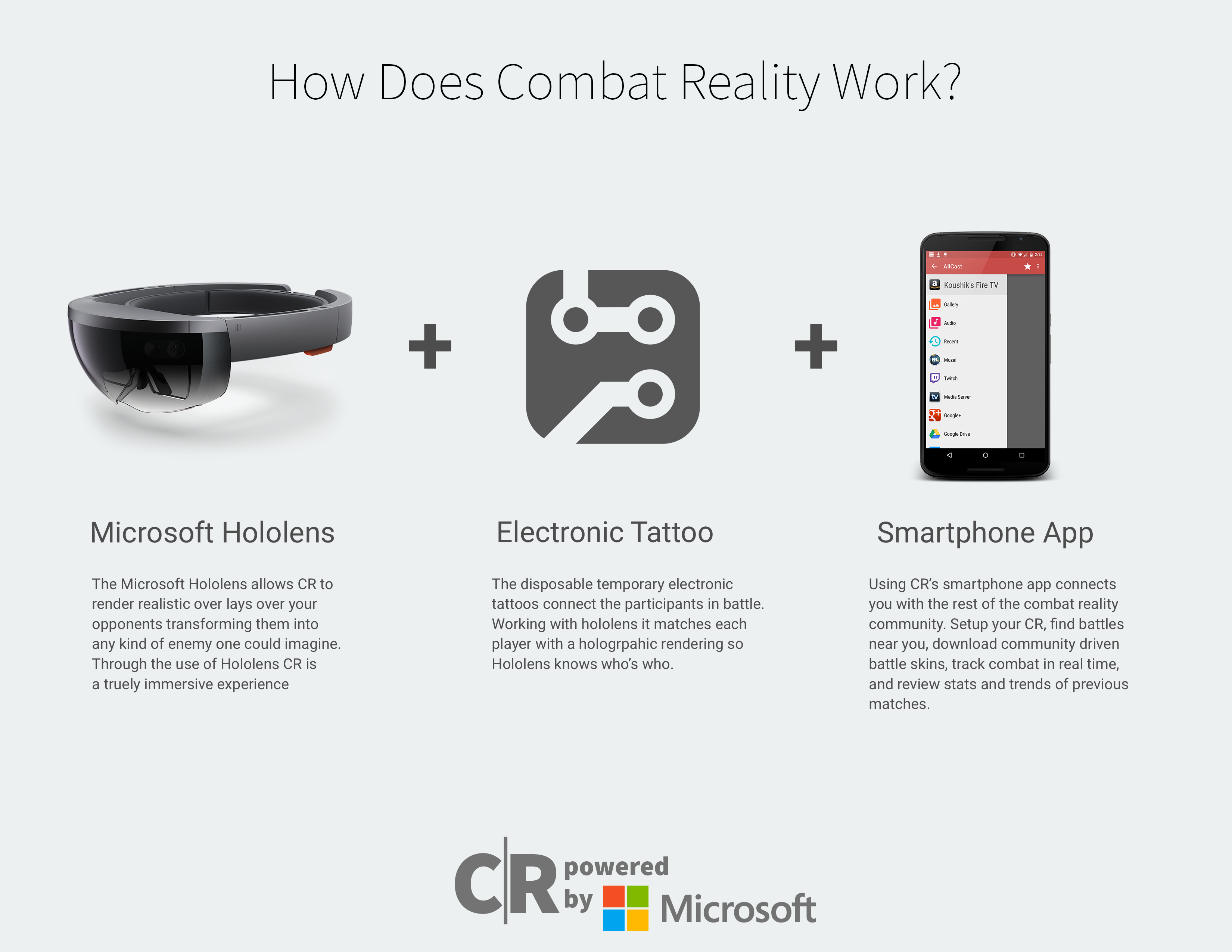
Combat Reality is a submersive augmented reality of combat style games. Powered by Microsoft’s Hololens, E-Tattoos, and a companion smart phone application, CR throws you into battles wherever you can go. Join matches near you, and download fighter skins all driven by the community. View real-time match statistics while in combat and review past games and scores from the app. Combat Reality challenges you to compete with with your friends and explore new places to battle across the world.
Tech Tattoos
Tyler Matteo – Review of Overcast
About the App
Overcast is a relatively new app in the crowded arena of podcast apps that includes established front runners such as Castro, Pocketcast, and even Apple’s own Podcasts.app. However, it has a good shot considered it was developed by the independent app developer Marcot Arment, known for popular apps such as Instapaper and The Magazine. Just from using the app, it is clear that it was built with the intention of being an aesthetically pleasing app that serves a purpose for the basic user while containing many robust features that don’t get in the way if you choose not to take advantage of them.
Functionality
Overcast, at it’s core, has a simple task to complete: manage and play podcasts. However, it successfully takes this seemingly simple premise and bakes in many layers of functionality that the user wouldn’t even know they wanted until they see it. After launching the app, the user is brought to their list of subscribed podcasts. This choice is in opposition to the alternative of showing a list of recently downloaded individual episodes and give the user a high level view with which to get to the show they want. Playlists are also shown on this primary list-view. The top and bottom margins are also packed with functionality. The button nav shows a simple play and pause button along with info on the currently playing show as well as buttons to pan 30 seconds forward or backwards. The top nav bar has four simple buttons: a settings button made obvious by being represented by the app’s logo, a downloads button that shows episodes being downloaded as well as their progress, a button to quickly create a new playlist, and an add button for adding a new podcast subscription. The screen for adding a new show is a great example of sneaking in features the user wouldn’t have thought they wanted but love once they see them. Users can, of course, search the entire directory for a show’s name or add it using its RSS URL but they can also browse new shows using recommendations from imported twitter followers or by browsers groups of pre-made “starter kits” based on categories such as “Comedy” or “Tech” or made up of networks such as “Relay.fm” or “5by5”.
Another thing worth considering is how this app handled monetization. The app, and all of the functionality you need to use it for you podcasting needs is totally free. The paid features are accessed via a simple, one time charge of $4.99 and include several power-use features. These include the ability to download new shows over cellular data, a feature that many casual users wouldn’t want anyway due to draining their data, as well as a unique audio accelerator that passively speeds up the audio in a way that is hard to notice to the human ear but can allow the user to cover many more shows over a large span of time.
Interface and Design
Overcast includes a lot of nice little design touches. The app is filled with a beautiful custom font and custom designed icons, as well a minimal interface that allows the shows’ artwork to show off across the entire app.The screen that shows when a show is playing is filled with this artwork except for the unobtrusive buttons that leave all the necessary functionality at your finger tips. The user can play, pause, and seek while still seeing the progress bar of the show. One touch I really like is showing the waveforms of the audio subtly over top of the artwork.
User Profiles
Users of this app will generally boil down into one of two categories: the casual listener and the power user. What’s great about this app is that the casual user can see all of their shows when it first boots up and add new ones with one click. Moreover, the audio controls once one is playing mirror that of familiar apps much as itunes. As their list of shows grows, they may choose to take advantage of playlists but their needs will generally be met by the free version. The power user, on the other hand, can organize their library into playlists and search for new shows based on the podcasters they know and love using the “kits” in the new show screen. Also the audio acceleration feature will allow them to chew up as many shows as possible in the limited amount of time they have available to listen.
objectified
Everything has a design, and each thing designed serves some sort of purpose. Things are designed to serve a purpose. The purpose given to something is not only a role for the designer, but also the consumer who finds personal value and purpose to fulfil their intentions. A well designed product is one that fulfils its purpose automatically. There should be no question what it is the user wants to accomplish, so there should be nothing hindering them. The design of something should be in harmony with the natural flow of one’s behavior. A well designed thing has the ability to be an extension of the user. Things like a pocket knife, a laptop, an instrument, or a vehicle can have character added to them based on how people use them. A skateboard, for example, is reflective of how the skater uses it, and the same goes with other well-designed things. Some things in life are so well designed that people dedicate their entire life into using that tool to carry out their will because it work so effectively. If it shapes to the user, works effectively, and is reliable, the designed tool can give newfound meaning to lives and shape implementation of willpower. They say a Samurai’s soul is one with his katana. A well designed thing will surpass the test of time, and can be trusted on, and can be your own.
Things are designed so that we can go about our lives fulfilling the tasks we are approached with on the regular. If there can be an easier way to do something, why not something to allow all to do said thing with ease? If anyone can do it, it can begin to be devalued. The value of the action is then associated with the item used to make it easier. The price of tools influence the price of services. Design gives forms to new ideas and a well-designed item is an attempt for users to come to terms with a new idea. It seems odd that we have many designers and people hired to make minuscule tasks easier but we still need workers to do mundane tasks. A well designed world would have automatic fast-food restaurants since everything in every restaurant only needs maybe 2 supervisors to maintain the machines. Roads should fix themselves, and cars should not need fuel, but rather just to be recharged. We have the ability to make a world full of efficacy and bounty, but our society seems to rather profit than collectively flourish. The highest paid designers design ascetically pleasing accessories. Design can help the world advance beyond imagine, but no one has seemed to design a better system for humanity to flourish together.
Augmented Reality
DreamCraft requires a pair of goggles and headphones. The headphones will deliver a sequence of binaural beats to put your self into a relaxed, meditative state. The goggles will then project a virtual sandbox where you can create 3-D structures, write notes anywhere, and create a visual representation of your mind. Dream Crafters will enter a lucid dream state where they can use tools provided. You may re-enter your world at any time and infinitely expand upon it. As a Dream Crafter explores their creativity, they will delve deeper and deeper into their minds as they tackle any situation they can conceive, and create circumstances that the Dream Crafter can live through as they figure out what all their deepest desires are. The primary purpose of dream craft is to increase the users ability to meditate, lucid dream, and self-actualize. With the opportunity to spend days in a lucid dream world where you are free to manifest nearly anything you could imagine, Dream Crafters could spend days in their mind while few real-time hours pass. DreamCraft is the key to unlocking the barriers between reality and perception. We all have this gift to create any original thought, so with DreamCraft, you are opening doors to an opportunity to explore all your thoughts, hopes, and dreams with vividity.
Augmented Reality
What problem does your app solve?
Visual learning access to those who are visual learners rather than auditory learners
What products have you seen that perform a similar task?
Movies based off of real events
How do successful apps present information to users?
They present information clearly and quickly. It should not take a lot of time or effort to get information.
How can you build on what works and make it unique?
Movies and YouTube videos are a big part of teaching and learning now so I think that these visual learning contacts could help aid even farther in that direction but with a different twist, of course.
What value does your app bring to your audience?
It will provide a better way of learning for those who struggle through the standard lecture and not taking that most classes require.
Proposal
Some students claim to be more visual learners rather than auditory learners. This creates a problem when most college classes are lectures. Now there are photos in most textbooks and some professors choose to show YouTube videos in class but are visual students getting what they need? I propose contact lenses that sync with an app that will allow the student to pick the subject they are studying and provide reenactments or moving diagrams to help demonstrate their school work. For example, if a professor was discussing a certain battle in the Civil War, the student would be able to pick that certain battle and be able to watch a reenactment of the battle right in front of them. This is also helpful for those who rather watch a movie instead of reading a book. This app and idea would have limitations though, since some subjects would be harder to have a visual aid then others.
MIRAJ
Snapchat Review
The usability of Snapchat stems from its systemically linear approach towards providing convenience and practicality. Snapchat is practical because it is a means of sending a message through imagery. This imagery is usually in the form of selfies; and, in a narcissistic society, this method of communication works fine. Why is Snapchat more convenient than a simple text message? The answer resides in the millennial users, who insist on conveying more information than text and emojis can satiate. They have a desire to share their faces, smiles and good times through a practical and powerful application where their friends also are.
Functionality is relative to performing functions a number of times. Snapchat’s primary function is taking and sending images and videos. Anyone can download the app, and it opens (Once you are logged in) to a distinct screen that displays the camera output. Through inference, children can figure out that swiping will bring the user to pages that display friends, snaps or Discover. When taking a picture or video, there is a big button at the bottom of the screen to show the functionality behind recording or snapshotting an image. Sending to other users is easy, as it is the next screen after taking the image and pressing continue. Adding users has become simpler due to an update that allows user to take a picture of a QR code on other Snapchat users’ devices.
Snapchat’s interface, design and aesthetic are all intertwined, as the interface delegates how the app is used and what it looks like. Design-wise, Snapchat is simple, uses emojis and icons to convey a majority of information. There is text, but it is used sparingly; namely, it is used in table view cells as naming information or time of the snapchat send. There is a conversation feature built within Snapchat, but it is primarily viable based on imagery sent between friends and acquaintances. The aesthetic is clean and simple, so as to appeal to users who do not want to deal with unnecessary or ancillary pages or objects that do not correspond with the theme of simplicity. There are only a few colors in use to designate what page the user is on, but design is seemingly becoming more scattered and less unified over time. This is because the developers are paying less attention to the overall unification and, instead, adding more features. For instance, when swiping left or right, there are different elements that distinguish each page, but they become lost in translation when viewing Snapchat from a hierarchical view.
Extra Credit Post_AWolfe
Write a 500 word review of an app or widget you use regularly. Reviews must be written in the 3rd person using professional language and discuss the usability, functionality, interface, design and aesthetics. Further, create a process flow diagram for that app or widget and persona for three users that would also interact with it regularly. (p.44-54 and p.66-71).
A popular application that is used by many smart phone users is Facebook with 86.1 million users (http://mashable.com/2014/04/03/popular-apps-chart/). Facebook allows users to connect with friends and family seamlessly through their smartphone and other electronic devices. Users of this application are able to private message an individual or a group of people, post statuses that include and are not limited to photographs, updates, locations and more. Users can use this application to play games, share events, and customize the information that is scene on their profile pages. The overall design of the Facebook application changes slightly each two to four weeks to help improve the website and application for the users to have a pleasant experience. The design of the application and website gives the users easy access and a continuous flow between various parts of the application and website. As far as the aesthetics for Facebook, it follows a simple color scheme that uses only blue and white with black text for the design of the website. Users are not able to customize the profile pages with different backgrounds and color schemes like that of MySpace and Twitter do.
Users who use this varies between ages 12 and over. Facebook is meant to be used by anyone and everyone in order to connect them to those they are friends with and to the world around them. User A is a 16 year old high school student who uses Facebook to connect with her friends and family. She uses the application to post pictures of her with her friends and statuses about her day-to-day life. User B is a 32 year old who works for a top accounting firm in Pittsburgh and uses the application to see what his friends are doing during the day when he works. He doesn’t post many statuses and pictures but had some photographs of his three kids and wife. User C is a 57 year old female who is about to see her oldest child get married. She posts statues and photographs of her daughter and son-in-law in engagement photos and photographs of family events. She also uses the application to snoop on friends and family and see what they are up too, private messaging her friends often to keep up with them. Each user uses the application in similar ways but some only use certain parts of the application because they feel it is to much information. The younger user use the application on smart phones and other electronics because they can understand the concept of those devices while the older uses only use it through computers and not to the fullest potential of the application.
Most users use the application differently, teenagers tend to put to much information out there and parents with younger children. This becomes interesting to see how different people and generations use the application whether it is because of understanding it or lack of understanding it.